Tag: gaming

  • How to download Minecraft Java Edition via TLauncher

    How to download Minecraft Java Edition via TLauncher

    Disclaimer

    I am just posting the links I found on the internet. I am not sure how come that TLauncher provides Minecraft for free, but it does and it works.

    If you think this is not legal, or I should not use it, please contact me via form, or send me an email to gaming@bymatej.com.

    I am in no way affiliated with TLauncher and/or Mojang/Minecraft.

    Thanks!

    Register at TLauncher website

    Go to TLauncher website: https://tlauncher.org/en/

    Use the Sign-Up link to create an account. After you create your account, please remember the username you used in the registration form. Your server admin might need it to whitelist you on their server.

    Download and install TLauncher

    As a prerequisite, ensure you have installed Java on your computer.

    Click on the Download TL button on the TLauncher website. Download the software for your OS.

    Windows version comes as an exe installer, while the Mac OS and Linux versions come as zip files. If you are a Windows user just double-click on the installer, follow the instructions and install. If you use Mac or Linux, just extract the zip file.

    Run TLauncher

    Open TLauncher.

    Select the latest Minecraft version from the dropdown. I used 1.14.4. Click the Install button and the TLauncher will download your Minecraft game.

    Check the Accounts checkbox and add your account you created in the first step.

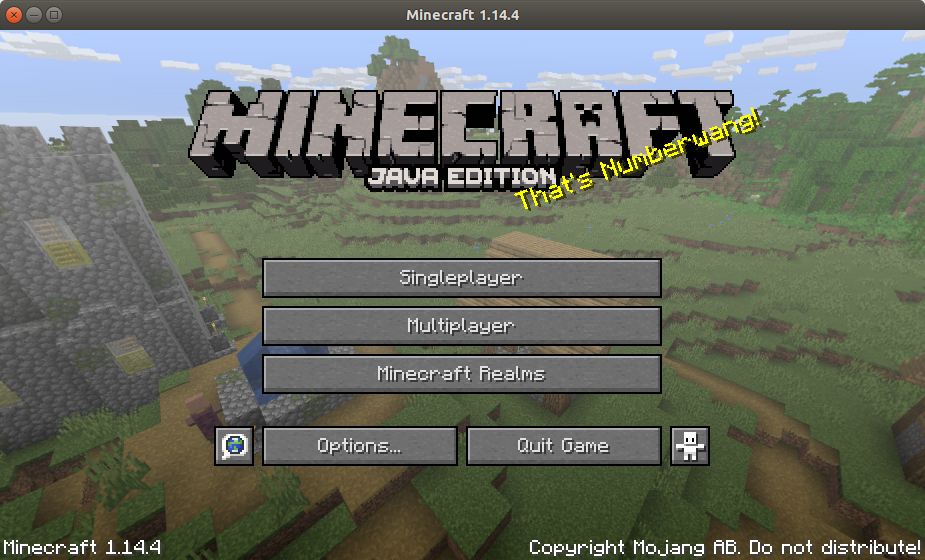
    After the game is installed, and the account is added, you will have the Enter the game button ready and it should look like this:

    If you get stuck or need help, please refer to this help article from TLauncher.

    Playing the game

    You can play in Singleplayer or in Multiplayer.

    If you play in Singleplayer mode, you can create your own world and you can have fun either in Creative mode or in Survival mode.

    You can play with your friends either in LAN (your local network), or Online (if you have a set up a server).

    Crafting guide

    Please, check this crafting guide: https://www.minecraftcraftingguide.net/
    Resources

  • Gaming

    Gaming

    My gaming story is not interesting.

    Unreal Tournament 2000 GOTY

    As most of the kids played various video games, so did I. I remember the PlayStation 1 days and old PC games back in the days.

    Now, as a grown-up man, I don’t have enough time to play games to the extent I used to. Also, I don’t track the gaming industry, so I don’t even know what is hot in the gaming world. PS4, Xbox and other consoles are something that I don’t want to waste my money on (I would rather buy another RC car). So, basically, I am out when it comes to games and gaming.

    Still, when I do play games this all boils down to actually two PC games.

    1. Unreal Tournament 2000
    2. Vietcong (1 and 2)
    3. Portal (1 and 2)

    Portal is something that you go through once and that is it. I might go through it again. I completed the Co-Op levels in Portal 2 together with my brother.

    Vietcong 2 is something I play with my family and friends. Pretty much the same guys from the band. I host a server on my tablet (yes, tablet) and then we all connect to it and play. We don’t play Vietcong 1 anymore. I think we should play it sometimes.

    Unreal Tournament 2000 is an oldie and I enjoyed playing it back in the days.

    So, when it comes to gaming (by me) I am still not sure whether I will dedicate a whole blog for just 2-3 games, but my goal would be something like this.

    I want to try to (somehow) host Vietcong 2 on my Linux server and keep it running all the time (so I don’t bother with my tablet). I just want some kind of server where we can play.

    Another thing I want is to revive the Unreal Tournament 2000 Snipermania server. I will try to replicate it as much as I can. Basically, Capture The Flag, only snipers, 15 minutes or 7 captures, map vote after each game, no bots, 16 players max. That is the plan. This game should work just fine on my Linux server. I just need to configure it properly.

    When I have my game server(s) up and running, I will protect them with a password, and I will change the password every now and then. The password will be publically available here on my web pages.

    Basically, that is the plan for gaming… I am either too old for games, or I am – as I like to say – stuck in the early 2000s when it comes to gaming.